A photo booth at a corporate event has a harder job than one at a birthday party. It still has to be fun, but it also has to look right in front of clients, carry your brand without feeling like an ad, and fit the rules of a downtown hotel or an office tower. Pick the wrong booth and it sits in a corner. Pick the right one and it becomes the spot everyone talks about the next morning.
We’ve run booths at Toronto conferences, product launches, galas and holiday parties for 3 years and 300+ events. This guide walks through the questions we ask every corporate client, so you can choose with confidence. If you’d rather skip ahead, our corporate events page shows the setups we recommend most.
Key takeaways
- Start with the goal (team fun, social reach, polished portraits or lead capture), then choose the booth.
- The AI photo booth add-on (it works with our photo booths — Mirror, Wooden Mirror, Classic and Drop-off Selfie, not the 360 video booth) suits conferences and networking; the 360 Video Booth suits launches and parties; the Mirror booth suits galas; the Classic booth suits office parties.
- Branding works best when it is built into templates, overlays and the backdrop rather than added as a sticker.
- Confirm load-in, power, space and a certificate of insurance with your venue early, especially downtown.
- Book 4 to 6 weeks ahead in general, and earlier for December holiday parties.
1. Start with what the booth needs to achieve
Before comparing booths, write down the one result that matters most. Most corporate events fall into one of these four goals:
- Team connection. Holiday parties, family days and milestone celebrations. You want something everyone joins, from interns to the leadership team.
- Social reach. Launches, activations and pop-ups. You want shareable content that carries your logo and hashtag onto personal feeds.
- Professional portraits. Conferences, career fairs and leadership events. Attendees want a photo they’d actually use on LinkedIn.
- A premium guest experience. Galas, award nights and client appreciation evenings. The booth has to look elegant in the room.
Once the goal is clear, the right booth is usually obvious.
2. Match the booth type to your event
AI Photo Booth Add-On: polished portraits for conferences and networking
The AI photo booth add-on works with our photo booths (Mirror, Wooden Mirror, Classic and Drop-off Selfie), not the 360 video booth. It retouches skin tones and lighting, enhances the image and can replace the background with a themed or branded scene. Guests get a studio-style portrait in seconds by QR code or email. It is the strongest choice when attendees are in business attire and you want images people are proud to share.
360 Video Booth: content for launches and parties
The 360 Video Booth records slow-motion clips as a camera arm circles guests on a lit platform. Each clip can open and close with your logo, carry a branded frame and use your music. It creates the most social content per guest, so it is the favourite for brand activations, store openings and after-hours parties. Plan for roughly 10 x 10 ft for the small platform and ideally 15 x 15 ft for the large one.
Mirror Photo Booth: elegance for galas and award nights
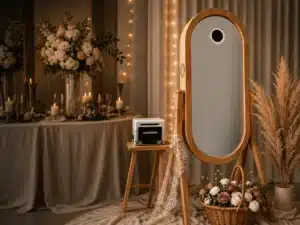
The Mirror Photo Booth is a full-length touch-screen mirror that looks like furniture until a guest walks up. Start screens and animations can use your brand colours, and every guest leaves with a branded instant print. It suits ballrooms, hotel event spaces and black-tie dress codes.
Classic Photo Booth: easy, inclusive team fun
The Classic Photo Booth is familiar and fast, with a DSLR camera, professional lighting and real unlimited prints. Nobody needs instructions, and it fits boardrooms, office lounges and smaller private dining rooms (about 8 x 10 ft). It is a reliable pick for holiday parties and team days.
Not sure? Many companies pair two experiences, such as a 360 for content and a print booth for keepsakes. You can compare every option on our photo booths page.
3. Plan your branding before you book
Branding is where a corporate booth earns its place in the budget. The most effective options are:
- A custom print template with your logo, event name and hashtag.
- Digital overlays on photos and 360 videos, plus branded start and sharing screens.
- A step & repeat backdrop with your company logo for launches and media moments. See backdrops and add-ons.
Send vector logos, brand colours, fonts and your hashtag as early as possible, ideally when you book. You’ll get a proof to approve before the event, so marketing and legal can sign off without a last-minute rush.
4. Check the venue logistics early
Toronto venues are wonderful, but they come with rules. Downtown hotels and office towers often require loading dock bookings, freight elevator times and vendor registration. A few things to confirm with your venue or building management:
- Space: enough floor area for the booth, the backdrop and a short line.
- Power: one standard outlet near the booth.
- Insurance: many venues ask for a certificate of insurance. We’re fully insured and provide one on request.
- Load-in: setup usually takes 45 to 60 minutes and doesn’t count toward your booked hours.
- Parking: check what your venue offers for vendor vehicles.
We cover offices, hotels and venues across the region, including Toronto, Markham, Mississauga and Vaughan. See every city on our GTA photo booth rental page. There’s no travel fee on most booths in our service area. Our How It Works page covers the full process.
5. Put the booth where the traffic is
Placement matters as much as the booth itself. Near registration, the bar or the main stage is ideal, because guests pass it naturally. Mention it in the event app and from the stage, and the line builds on its own.
6. Use the content after the event
The event ends, but the content keeps working. You’ll receive an online gallery of every photo and video, usually within 24–48 hours. Share it on your intranet, in your next newsletter and on your social channels.
7. Book early, especially for December
Holiday party season is the busiest time of year for Toronto photo booths. We recommend booking at least 4 to 6 weeks ahead in general, and earlier for December Fridays and Saturdays. A 50% deposit secures your date, and the balance is due on the event day. There’s no minimum booking time. Standard packages start at 2 hours; 3-hour, 4-hour and longer bookings are available, so you book the hours you need.
Frequently asked questions
It depends on your goal. Choose the 360 Video Booth for shareable content at launches and parties, the Mirror Photo Booth for galas and award nights, and the Classic Photo Booth for relaxed office and holiday parties. For professional portraits at conferences, add the AI photo booth add-on to any of our booths.
Yes. Print templates, digital overlays, start screens, sharing screens and step & repeat backdrops can all carry your logo, colours and hashtag. You approve a proof before the event.
Yes. Photobooth By Zee is fully insured, and a certificate of insurance is available on request for your venue or building management.
A Classic booth needs about 8 x 10 ft, and a Mirror booth about 10 x 10 ft. The 360 Video Booth needs about 10 x 10 ft for the small platform and ideally 15 x 15 ft for the large platform. Every booth needs one standard power outlet.
Every corporate quote is tailored to the booth, hours, branding and add-ons you choose. Send your details through the quote form and we’ll reply with availability and a custom quote.
Plan your corporate photo booth
Tell us your date, venue and goal and we’ll recommend the right setup. 3 years, 300+ events and a 100% satisfaction guarantee.
Get a free quoteCall or text +1 437 974 6999